Compare Spreadsheets for Excel
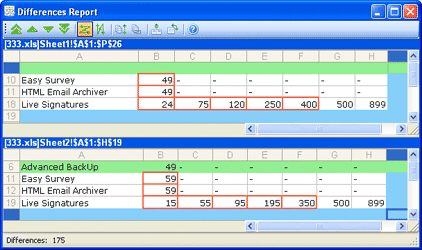
Compare Spreadsheets for Excel is a powerful and extremely useful software for analyzing differences in MS Excel files. It has a friendly interface and allows the user to add files for comparison in the “wizard” mode. Unlike ExcelDiff, Compare Spreadsheets has a side-by-side comparison interface with extensive capabilities for reviewing and editing files.


Pros:
– compare entire files, spreadsheets or the selected range of cells
– comparison by cell values or by formulas
– align two tables by rows and by columns
– direct editing of the original document without opening it in MS Excel
– custom highlighting colors
– diff navigation
– support for the latest MS Excel 2007 version
Cons:
– no support for multiple comparison projects
– the user cannot save the target file in the original format (however, the user can use copy/paste method)
– no custom reports
– automerge functionality is unavailable
Overview
Of all the programs we’ve reviewed on our site, Compare Spreadsheets for Excel is the best way to compare MS Excel files. We recommend this software for people who work with a lot of MS Excel data.
Our rating for this software is 7/10. It is also our Editor’s choice as the most suitable software for MS Excel files comparison.
Price: $59.00 USD (FREE TRIAL)
Diverse comparison methods 
Three-way comparison
Text navigation 
Report functionality
Merge functionality
Integration with version control systems Yes
Folder comparison
Folder hierarchy synchronization
Custom file filters
Byte-by-byte comparison