WinMerge


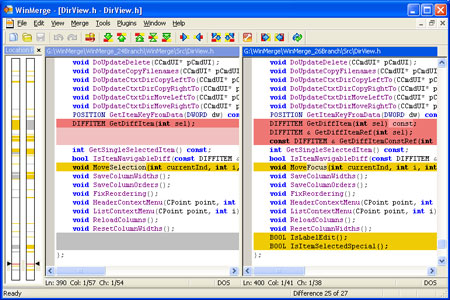
WinMerge is a popular file comparison software which enables the user to compare text files, source code and synchronize folders. WinMerge contains color-coded, side-by side interface with convenient navigation to the lines of the compared files using toolbar buttons and menu commands. WinMerge provides for merge capabilities as well, allowing the user to copy the selected lines to the opposite file.
File comparison: 
WinMerge has a convenient Windows interface with several panes, including main comparison pane, diff pane and location pane. Diff pane allows the user to review the smaller part of the text, while the location pane contains the “page view” of both compared files. The user can work with multiple projects, with each comparison project opened in a separate window. The project windows can be cascaded or tiled horizontally/vertically. The differences in the compared files are highlighted, according to the selected comparison method. WinMerge supports line comparison and char comparison diffs. The user can easily navigate through the compared text using toolbar buttons and Find/ Replace and Go To commands. WinMerge also allows the user to change case in the selected text, insert current date, etc. The files can also be opened with third-party application (for instance, MS Word). The target files can be formatted for various operating systems: DOS (by default in Windows environment), UNIX, and MAC. WinMerge also contains patch generating capabilities.
Folder comparison:
WinMerge also allows the user to synchronize folders containing similar files. All files in both folders are listed in a single window, allowing the user to merge folders or copy selected files in the opposite folder. WinMerge allows the user to save the folder comparison statistics in a report file. However, WinMerge report contains a list of files in both folders, with no analytical information. The user can also create custom rule-based filters to specify the types of files that can be opened with WinMerge, as well as more detailed line filters.
Summary
WinMerge cannot compare binary files, PDF files, and archives. That is why the application area of this software is somewhat restricted. It also has a slightly complicated user interface and some abundant functionality. Besides, WinMerge has insufficient report capabilities. Therefore, WinMerge is not the best solution for office document comparison: its user interface and functionality are less convenient than Compare Suite, for instance (please see our previous post). However, WinMerge has powerful functionality for integration with various version control systems and could be used as an external diff in CVS and similar revision control environment.
WinMerge is an open source software. Our rating for this software is 6/10. It is our Editor’s choice as an optimal external diff tool for text and source code comparison in revision control environment. Besides, WinMerge is a freeware.
Price: Free
Supported file formats: plain text, HTML/XML, source code
Diverse comparison methods 
Three-way comparison
Text navigation
Report functionality
Merge functionality
Integration with version control systems Yes
Folder comparison
Folder hierarchy synchronization
Custom file filters 
Byte-by-byte comparison